
# Java 8 List 集合的流式操作
# 对集合进行排序
// 测试数据,请不要纠结数据的严谨性 | |
List<StudentInfo> studentList = new ArrayList<>(); | |
studentList.add(new StudentInfo("李小明",true,18,1.76,LocalDate.of(2001,3,23))); | |
studentList.add(new StudentInfo("张小丽",false,18,1.61,LocalDate.of(2001,6,3))); | |
studentList.add(new StudentInfo("王大朋",true,19,1.82,LocalDate.of(2000,3,11))); | |
studentList.add(new StudentInfo("陈小跑",false,17,1.67,LocalDate.of(2002,10,18))); |
# 按照年龄的排序 <span style="color:#c7254e;background-color:#f9f2f4">(升序)</span>
// 按年龄排序 (Integer 类型) | |
List<StudentInfo> studentsSortName = studentList.stream().sorted(Comparator.comparing(StudentInfo::getAge)).collect(Collectors.toList()); |
# 按照年龄倒序排列 <span style="color:#c7254e;background-color:#f9f2f4">(倒序)</span>
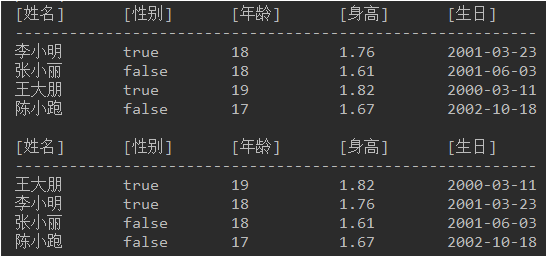
也就是在上面的排序基础上使用 reversed () 方法使得倒序查询
// 按年龄排序 (Integer 类型) | |
List<StudentInfo> studentsSortName = studentList.stream().sorted(Comparator.comparing(StudentInfo::getAge).reversed()).collect(Collectors.toList()); |
结果如图所示:
# 使用年龄进行降序排序,年龄相同再使用身高升序排序 <span style="color:#c7254e;background-color:#f9f2f4">(多字段排序)</span>
也就是在第一次排序的基础上,进行二次排序使用的 <span style="color:#c7254e;background-color:#f9f2f4">.thenComparing</span> 来进行二次排序
// 按年龄排序 (Integer 类型) | |
List<StudentInfo> studentsSortName = studentList.stream() | |
.sorted(Comparator.comparing(StudentInfo::getAge).reversed().thenComparing(StudentInfo::getHeight)) | |
.collect(Collectors.toList()); |
# 获取某个属性最大的一条数据 <span style="color:#c7254e;background-color:#f9f2f4">(获取属性值最大的一条数据)</span>
// 获取年龄最大的 StudentInfo | |
StudentInfo maxStudentsSortName = studentList.stream().max(Comparator.comparing(StudentInfo::getHeight)).get(); |
在此处最后的 <span style="color:#c7254e;background-color:#f9f2f4">.get</span > 会报黄,提示信息如下图:
因为最后的 get () 如果没有 get 到值,就会报出异常。使用 < span style="color:#c7254e;background-color:#f9f2f4">.orElse ()</span > 来处理

// 获取年龄最大的 StudentInfo | |
StudentInfo maxStudentsSortName = studentList.stream().max(Comparator.comparing(StudentInfo::getHeight)).orElse("没有最大值时给他的值"); |
# 对集合进行过滤
// 测试数据,请不要纠结数据的严谨性 | |
List<StudentInfo> studentList = new ArrayList<>(); | |
studentList.add(new StudentInfo("李小明",true,18,1.76,LocalDate.of(2001,3,23))); | |
studentList.add(new StudentInfo("张小丽",false,18,1.61,LocalDate.of(2001,6,3))); | |
studentList.add(new StudentInfo("王大朋",true,19,1.82,LocalDate.of(2000,3,11))); | |
studentList.add(new StudentInfo("陈小跑",false,17,1.67,LocalDate.of(2002,10,18))); |
# 获取名字为 <span style="color:#c7254e;background-color:#f9f2f4"> 张小丽 </span > 的信息
// 按年龄排序 (Integer 类型) | |
List<StudentInfo> studentsSortName = studentList.stream() | |
.filter(s->s.getName().equals("张小丽")) | |
.collect(Collectors.toList()); |
# Stream 管道流 map 的基础用法
# 将集合中的每一个字符串,全部转换成大写
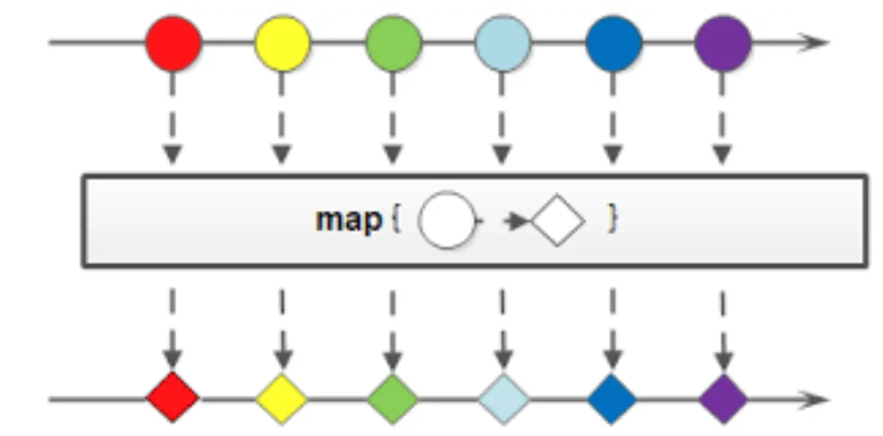
// 不使用 Stream 管道流}// 使用 Stream 管道流// 上面使用了方法引用,和下面的 lambda 表达式语法效果是一样的//List<String> collect = alpha.stream().map(s -> s.toUpperCase()).collect(Collectors.toList());
所以 map 函数的作用就是针对管道流中的每一个数据元素进行转换操作。
# 处理非字符串类型集合元素
map () 函数不仅可以处理数据,还可以转换数据的类型。如下:
List<Integer> lengths = alpha.stream() | |
.map(String::length) | |
.collect(Collectors.toList()); | |
System.out.println(lengths); //[6, 4, 7, 5] |
Stream.of("Monkey", "Lion", "Giraffe", "Lemur") | |
.mapToInt(String::length) | |
.forEach(System.out::println); |
除了 mapToInt。还有 maoToLong,mapToDouble 等等用法.
# 处理对象数据格式转换
需求如下:
- 将每一个 Employee 的年龄增加一岁
- 将性别中的 “M” 换成 “male”,F 换成 Female。
public static void main(String[] args){ | |
Employee e1 = new Employee(1,23,"M","Rick","Beethovan"); | |
Employee e2 = new Employee(2,13,"F","Martina","Hengis"); | |
Employee e3 = new Employee(3,43,"M","Ricky","Martin"); | |
Employee e4 = new Employee(4,26,"M","Jon","Lowman"); | |
Employee e5 = new Employee(5,19,"F","Cristine","Maria"); | |
Employee e6 = new Employee(6,15,"M","David","Feezor"); | |
Employee e7 = new Employee(7,68,"F","Melissa","Roy"); | |
Employee e8 = new Employee(8,79,"M","Alex","Gussin"); | |
Employee e9 = new Employee(9,15,"F","Neetu","Singh"); | |
Employee e10 = new Employee(10,45,"M","Naveen","Jain"); | |
List<Employee> employees = Arrays.asList(e1, e2, e3, e4, e5, e6, e7, e8, e9, e10); | |
/*List<Employee> maped = employees.stream() | |
.map(e -> { | |
e.setAge(e.getAge() + 1); | |
e.setGender(e.getGender().equals("M")?"male":"female"); | |
return e; | |
}).collect(Collectors.toList());*/ | |
List<Employee> maped = employees.stream() | |
.peek(e -> { | |
e.setAge(e.getAge() + 1); | |
e.setGender(e.getGender().equals("M")?"male":"female"); | |
}).collect(Collectors.toList()); | |
System.out.println(maped); | |
} |
# flatMap
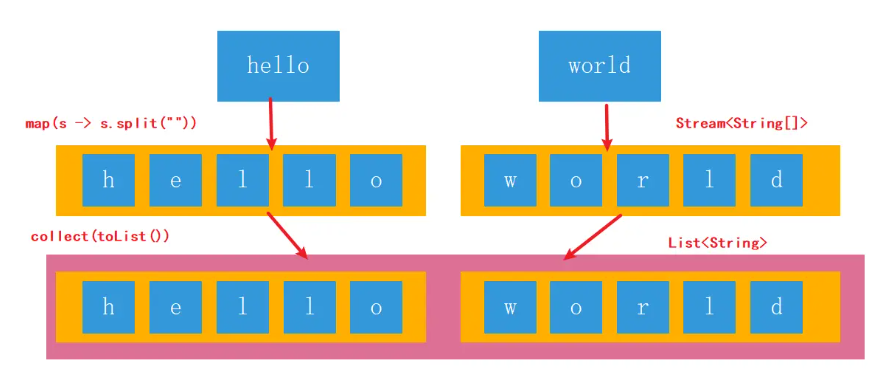
由于 map 的参数 e 就是返回值,所以可以用 peek 函数。peek 函数是一种特殊的 map 函数,当函数没有返回值或者参数就是返回值的时候可以使用 peek 函数。 map 可以对管道流中的数据进行转换操作,但是如果管道中还有管道该如何处理?即:如何处理二维数组及二维集合类。实现一个简单的需求:将 “hello”,“world” 两个字符串组成的集合,元素的每一个字母打印出来。如果不用 Stream 我们怎么写?写 2 层 for 循环,第一层遍历字符串,并且将字符串拆分成 char 数组,第二层 for 循环遍历 char 数组。
List<String> words = Arrays.asList("hello", "word"); | |
words.stream() | |
.map(w -> Arrays.stream(w.split(""))) //[[h,e,l,l,o],[w,o,r,l,d]] | |
.forEach(System.out::println); |
输出打印结果:
java.util.stream.ReferencePipeline$Head@3551a94
java.util.stream.ReferencePipeline$Head@531be3c5
用 map 方法是做不到的,这个需求用 map 方法无法实现。map 只能针对一维数组进行操作,数组里面还有数组,管道里面还有管道,它是处理不了每一个元素的。
![image-20230216165351509]()
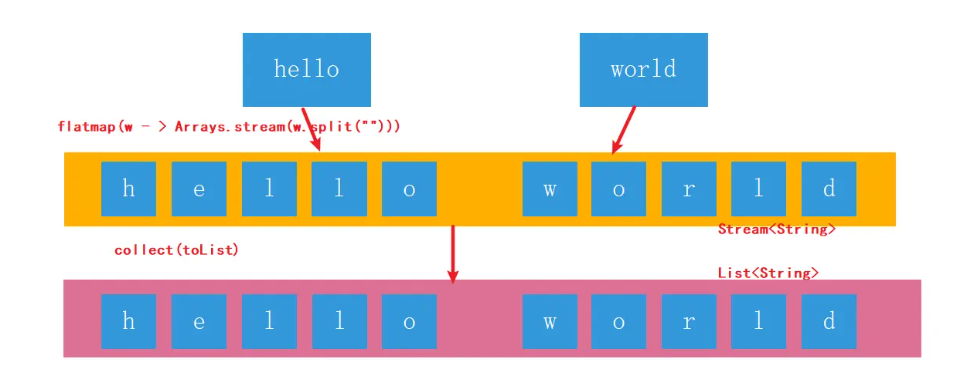
flatMap 可以理解为将若干个子管道中的数据全都,平面展开到父管道中进行处理。
words.stream() | |
.flatMap(w -> Arrays.stream(w.split(""))) // [h,e,l,l,o,w,o,r,l,d] | |
.forEach(System.out::println); |
输出打印结果:
h
e
l
l
o
w
o
r
d